
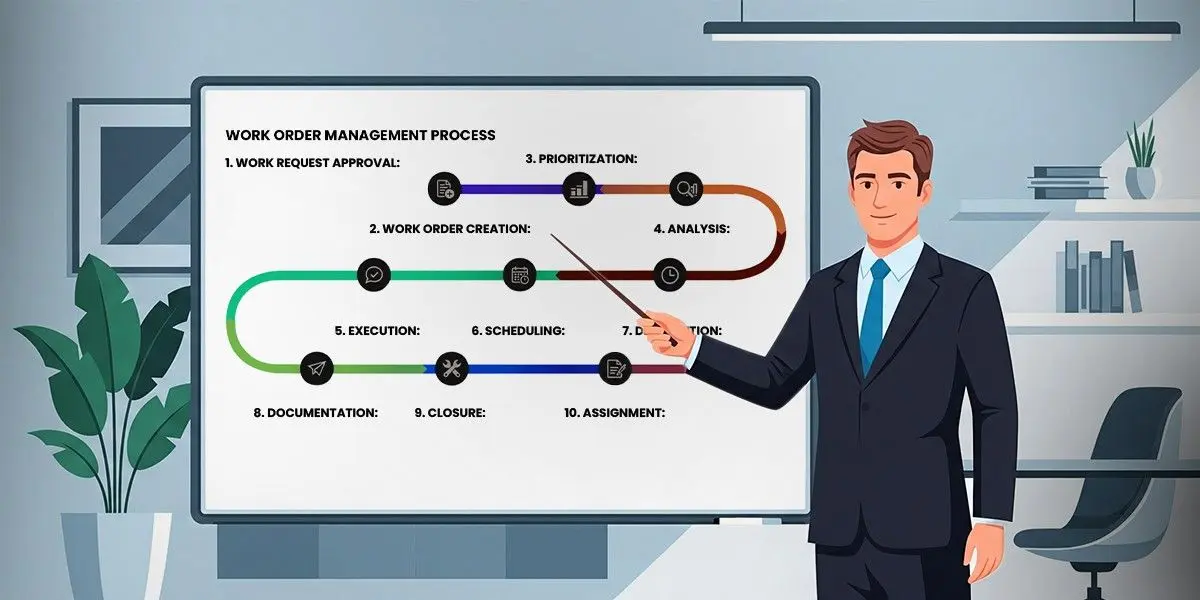
Every business has work orders, they are used in manufacturing, retail, the facilities department, the ISPs, the IT help desk...you name it. These are the rules that lay out the specifics for what should be done, by whom, and when it should be done. That seems easy on paper. In reality, trying to keep on top of hundreds or thousands of tasks from multiple teams, places and priorities can quickly become overwhelming.
Work order management software can assist with it. By centralizing requests, automatically assigning tasks, and giving everyone visibility into what’s being worked on, it’s looking to bring order to the madness. When properly implemented, it doesn’t just make things more efficient; it reduces delays, increases transparency and actually, you know, saves money. Many modern platforms leverage technologies like Asana AI to further automate workflows and improve task prioritization.
What is work order management software, how does it operate, and why is it becoming more and more popular among businesses? Let's dissect it.
Defining work order management software
A digital platform called work order management software arranges, monitors, and controls all of the tasks or service requests that are made inside a company. Consider it a central location for submitting, approving, assigning, and monitoring requests until they are fulfilled.
Spreadsheets, emails, and disjointed tools are replaced with a systematic framework. By doing this, supervisors can keep an eye on progress in real time and make sure nothing gets lost.
Facilities management, manufacturing, construction, healthcare, information technology, and field services are among the businesses that frequently use the program. However, the ideas are applicable anytime groups require a dependable method for recording, monitoring, and finishing tasks. Platforms that integrate Asana AI are quickly gaining popularity due to their smart automation and easy to use interface.
How work order management software works
The fundamental steps of work order management software are request, assign, execute, and close. How well it ties these steps together is what makes it valuable.
Establishing and Documenting Work Orders
A request starts the procedure. A requirement is brought up by a technician, client, or staff member; it could be for repairs, IT assistance, or equipment upkeep. The request is entered straight into the system rather than via email or a paper form. In order to immediately turn inquiries into work orders, some platforms even integrate with email or chat with the help of Asana AI.
Setting priorities and assigning tasks
The system assists in prioritizing tasks according to established rules, availability, or urgency after they have been captured. In more complex configurations, the software can automatically distribute work orders based on geography, skill level, or workload, or managers can assign work orders to certain individuals or teams. This guarantees that the appropriate job is assigned to the appropriate individual promptly. Improve task assignment by integrating Asana AI, which predicts the past performance data and provides best results.
Monitoring and Execution
When a technician or team receives a work order, they can view all the information in one location, including the tasks that need to be completed, the resources needed, the timeframes, and the directions. Real-time updates are recorded as they happen. Here, mobile access is highly helpful, especially for field personnel who need to update status while on the go.
Finalization and Settlement
The team marks the task as complete once it is finished, frequently including checklists, comments, or pictures as evidence. After that, the closure is recorded by the system and fed into analytics and reports that demonstrate how effectively activities are being completed.
Reporting and Understanding
The data generated is arguably the most underappreciated feature. Average completion times, backlog levels, reoccurring problems, and resource usage are all visible to managers. These insights assist companies in preventing issues before they worsen and in responding more quickly. Advanced platforms using Asana AI improve these analytics with predictive insights to avoid issues and suggest process improvements.
Why businesses rely on work order management software
The visibility and structure that work order management software offers are what make it valuable. Without it, teams are forced to use disjointed technologies, which frequently results in missed deadlines and redundant work. Every task is measurable and traceable using it.
Delays in maintenance can cost thousands of dollars per hour in manufacturing, for instance. An organized work order system expedites the logging, assignment, and resolution of maintenance requests. Tenant requests in facilities management are now recorded in a single system, given a priority rating, and managed with transparent accountability rather than being lost in email chains.
Businesses benefit most when they move from reactive to proactive activity. Teams can confidently plan, forecast, and optimize resources rather than continuously battling fires. Modern tools like Asana AI support this shift by automating decisions and highlighting priority tasks.
Features that make it work
Although platform-specific details differ, the majority of work order management software has the following elements in common:
- Centralized request platform, making it clear to everybody where requests can be made.
- Reduced manual coordination through automated assignments.
- Mobile accessibility for remote teams and field personnel.
- Real-time monitoring to see how things are going.
- Analytics and reporting to gauge performance.
Many advanced solutions now use Asana AI to enhance automation and deliver optimal insights. Entry-level tools and enterprise-grade systems are frequently distinguished by the complexity of these characteristics. Integration with workflow management systems like Asana, ERP, or CRM becomes crucial for larger businesses.
Key benefits for organizations
Using work order management software has benefits beyond productivity.
- Accountability becomes better. All requests are recorded, and roles are well defined.
- There is less downtime. Reduced operational effect results from faster resolution.
- The expenses are under control. Resources are used more efficiently by identifying reoccurring problems and streamlining scheduling.
- Employee and customer happiness increases. Prompt response to requests fosters dependability and confidence.
Because with the integration of tools such as Asana AI, it gets rid of the constant back and forth of spreadsheets and emails, even companies with relatively simple operations frequently find the switch to be profitable.
Choosing the right work order management software
Not every firm will benefit from every platform. Scale, industry, and integration requirements all influence the decision. While a multinational manufacturing plant could require sophisticated automation, predictive maintenance, and reporting connected to current enterprise systems, a small plant might only require a simple tool with mobile updates.
Usability is essential. Teams' resistance to complex systems is a common reason why software adoption fails. Make sure the tools you choose interact with your current digital stack and strike a balance between power and ease of use.
Take into account the vendor's roadmap and support as well. Work order systems should change as your company expands and technology develops; they aren't simply for today's demands.
Bringing it all together
Work order management software helps operations become more disciplined, transparent, and accountable. It does more than just keep track of tasks. It saves time waste, establishes a single source of truth, and transforms haphazard requests into ordered, trackable labour.
It's no longer nice to have for businesses hoping to increase dependability, decrease downtime, and function more confidently. It is an essential instrument for maintaining competitiveness.
Ready to streamline your workflows?
Let’s simplify your workflows and implement an enterprise-grade workflow platform like Asana, set work order management systems according to your needs! Connect with Addrs Labs and explore the best work order management software for your business!




Comments (0)
No comments posted yet. Be the first to comment!